Step 1
Hindi captions, word by word
Klipzam writes Hindi captions in Devanagari. In the Captions panel each line shows its language: HI, EN or HI+EN.
Step 2
Fix words in one list
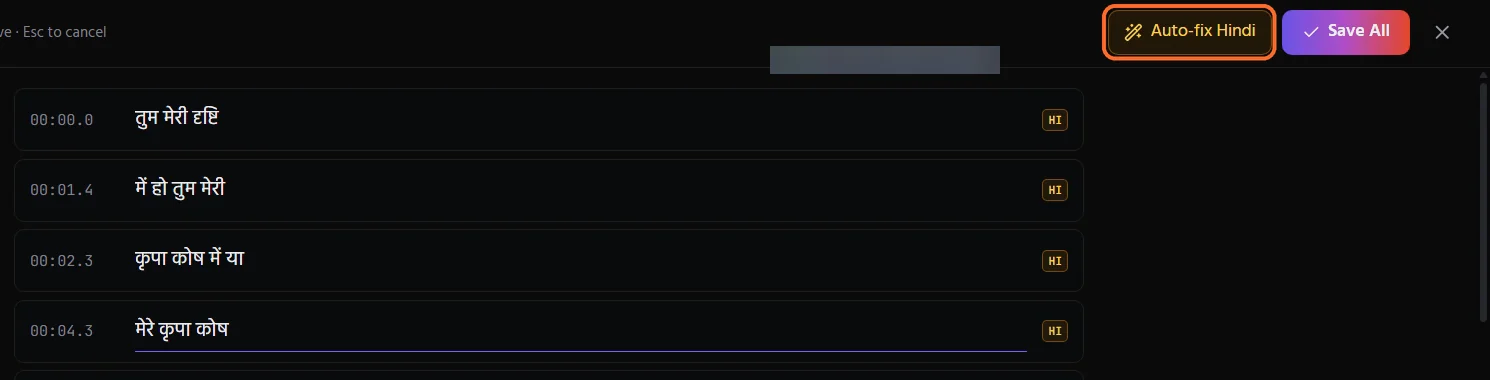
Click Edit captions to see every line. Auto-fix Hindi turns Hindi typed in English letters into Devanagari; click Save All when you’re done.
Step 3
Switch to Roman Hindi
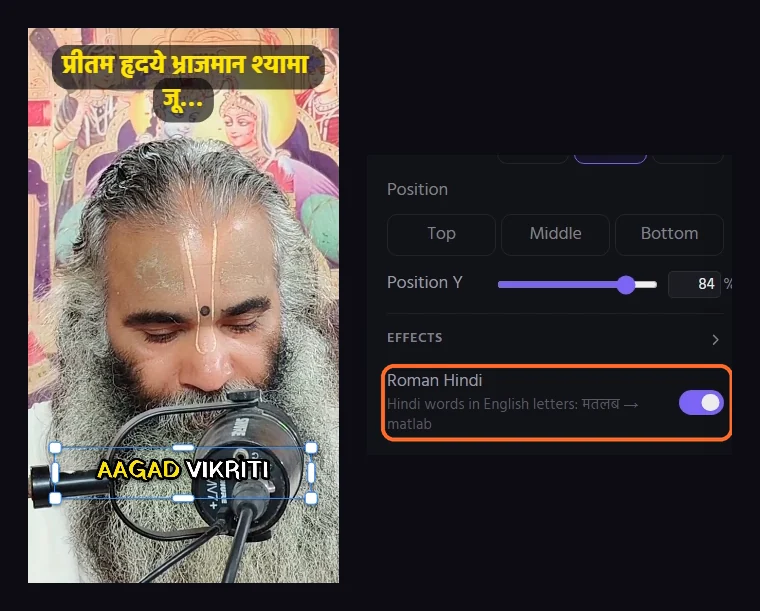
Open Caption style, scroll to Effects and switch on Roman Hindi: Hindi words appear in English letters (मतलब → matlab). Switch it off to go back to Devanagari.
Tips
- Hinglish audiences often read Roman Hindi faster; a Hindi-first audience usually prefers Devanagari.
- Every caption font covers Devanagari, so Hindi keeps its shape in every caption style.
Questions
Does Klipzam understand Hinglish?+
Yes. Hindi, English and Hinglish (mixed) are all transcribed, and each line is marked HI, EN or HI+EN.
Does Roman Hindi change my caption text?+
No. It only changes how Hindi words are shown; switch it off and the Devanagari comes back.